Morning. I come to work, make coffee, and sit in my chair, the one I set up the way I like. I open my laptop, ready to start the next task. Yesterday's task is closed. All tests on TeamCity are green.
This story is not one real event. I built it from real CI problems I had myself, and from similar cases I saw later.
Here for the feature itself, not the story? Jump to Compare Builds →In this story
- A few days of hell: how to debug a flaky test
- Compare Builds instead of logs
- Parameters → Only different: the suspects are in the diff
- Two different "todays": Java and the database live in different time zones
- The other tabs: three real-life cases
- Where Compare Builds helps — and where it doesn't
- Epilogue
- Takeaway
- FAQ
Then I see a Slack message from a colleague in the team channel. Last night he tried to push his task through TeamCity, but the build failed several times on a test called shouldSaveTransaction. A simple test: it checks that a bank transaction is saved.
Here is the problem: I wrote that test yesterday. During the day, everything passed. In the evening, it passed too.
I feel two fears at the same time. "My broken code will go to production." And "the whole team is watching — I broke the build." Then my boss writes in the chat: "Run the tests before pushing to main." But that is exactly what I did. I want to disappear.
I run the test on my machine. The project compiles very slowly. Normally I don't even notice it. Today every module feels like one more "it's your fault".
The test is green. Relief.
I find the commit where my colleague's build failed, check it out, and run the test again. Green. I run the whole package — maybe other tests near it are the problem. All green. I open TeamCity and trigger the same configuration manually. Maybe the run itself is different. Green. The relief turns into confusion. Now I know what I want to see: a red test. A red test would at least explain something.
A classic flaky test. It passes on my machine, it almost always passes in CI, and sometimes it fails.
Here is the test itself, a plain JUnit 5 test. Look at it the way I did, a hundred times in those days:
@Test
void shouldSaveTransaction() {
    // init
    Account sender = Account.createAccountFor("sender");
    Account recipient = Account.createAccountFor("recipient");
    // exec
    sender.transfer(recipient, 100);
    // check
    assertEquals(1, sender.getTransactions(LocalDate.now()).size());
}
It looks like a normal domain test. Nothing here can fail. At least, that is what I keep telling myself. (Spoiler: I am wrong. But you cannot see the reason in this code. Half of the problem is right in front of you. The other half is hiding deeper, under this code.)
A few days of hell: how to debug a flaky test
At this point I had already done the boring first half of the work correctly. I ran the test on the same commit. I ran more tests. I ran the same configuration on CI. The simple explanations are all dead: the same commit passes, other tests don't break it, a manual run on CI is green. So something changes between runs. Next step: make the test tell me more.
Round one. Hypothesis one: getTransactions() can't see the transaction we just saved. I add log4j to the test, level DEBUG. What we did and what we found:
private static final Logger log = LogManager.getLogger(TransactionsTest.class);

@Test
void shouldSaveTransaction() {
    Account sender = Account.createAccountFor("sender");
    Account recipient = Account.createAccountFor("recipient");

    sender.transfer(recipient, 100);
    log.debug("transferred 100: sender -> recipient");

    LocalDate today = LocalDate.now();
    List<Transaction> transactions = sender.getTransactions(today);
    log.debug("today={} found={}", today, transactions.size());

    assertEquals(1, transactions.size());
}
I don't want to search for these lines in a huge build log later. So I write them to a separate file and publish it as a build artifact:
// .teamcity/settings.kts
object Build : BuildType({
    name = "Build"

    // test logs become an artifact of every build
    artifactRules = "target/logs/test-*.log => test-logs.zip"
})
Day two, day three — the nightly build stays green. I relax. Fine, it fixed itself.
Then the admins write to me. This configuration runs many times a day, and my log artifacts eat disk space fast. Please remove them. I turn them off.
The next morning, the test is red. Damn it. Schrödinger's test: green while you watch it, red the moment you stop. Every morning is the same. I open TeamCity and think "today I will know if it's fixed". I learn nothing.
I turn the logs back on and make a deal with the admins: I will clean the artifacts myself. And I get lucky. The test fails at night, and I have the log:
DEBUG  transferred 100: sender -> recipient
DEBUG  today=2026-08-14 found=0
The log says exactly what I expected, but it proves less than I hoped. transfer() finished without errors. The query "for today" returned an empty list. That is all I know.
Round two. Hypothesis two: the transaction is not saved at all. I separate writing from reading. I count the transactions before and after — all of them, no date filter:
int before = sender.getAllTransactions().size();

sender.transfer(recipient, 100);

int after = sender.getAllTransactions().size();
log.debug("before={} after={}", before, after);
I wait for a failure. And here it is:
DEBUG  before=0 after=1
DEBUG  today=2026-08-14 found=0
The transaction exists.
Saving works.
The "for today" query can't see it.
So transfer() is not a suspect anymore. The problem is somewhere between the date we write and the date we search for. And the most suspicious word in the test now is today.
Is it magic? I tell myself: no magic. There is a simple reason. But one more log line from the application will not help me. I need to know how one run is different from another.
Compare Builds instead of logs
Funny thing: years later I built Compare Builds in TeamCity myself. Partly because I needed exactly this tool on exactly this kind of night. The feature exists since TeamCity 2019.2, so any modern version already has it. Don't write log line number 101. Compare the failed build with the nearest green one instead.
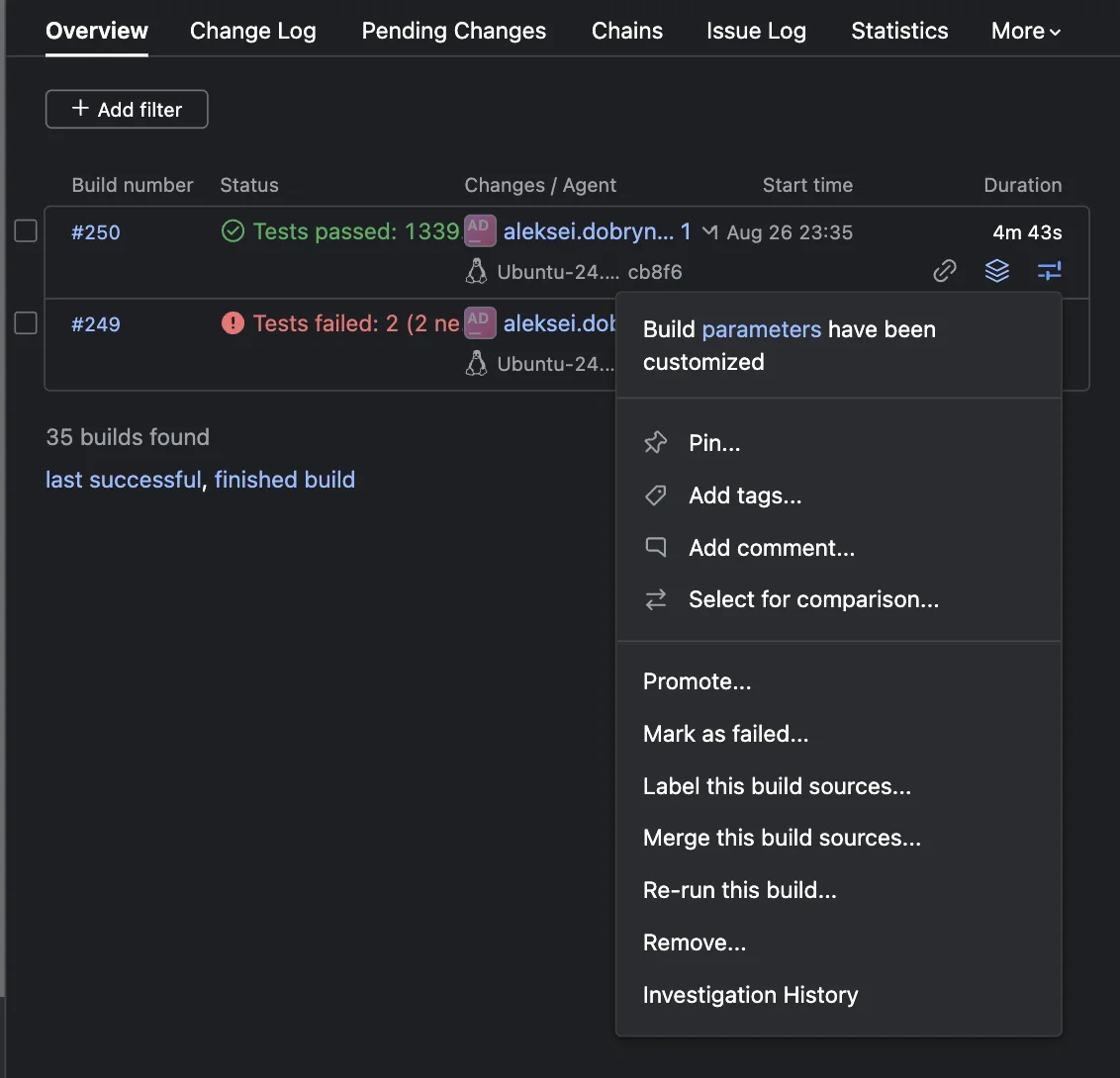
- Open the green build #250 → Actions ("…") menu → Select for comparison…
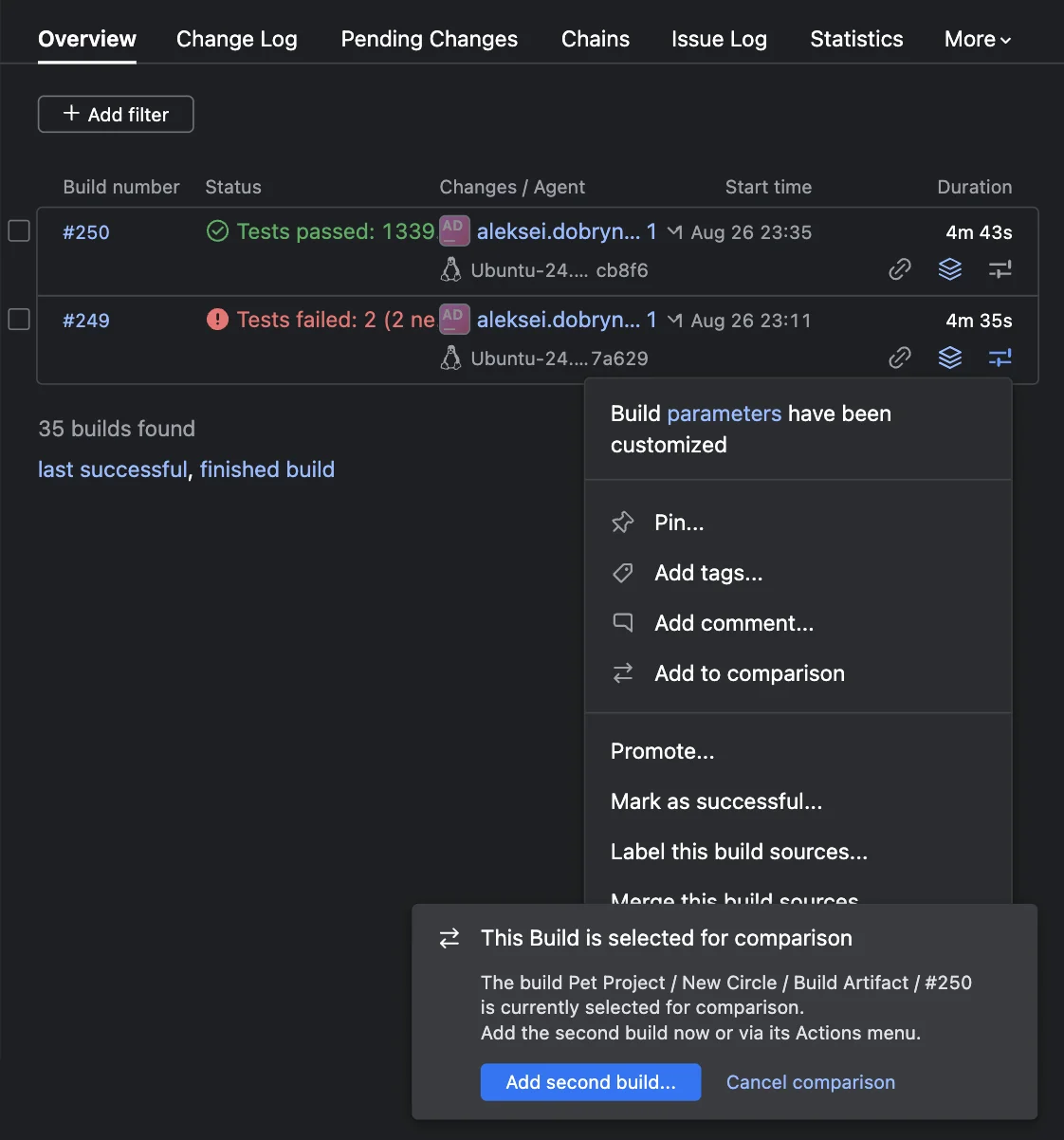
- Open the failed build #249 → Actions → Add to comparison.
The Compare Builds window opens:
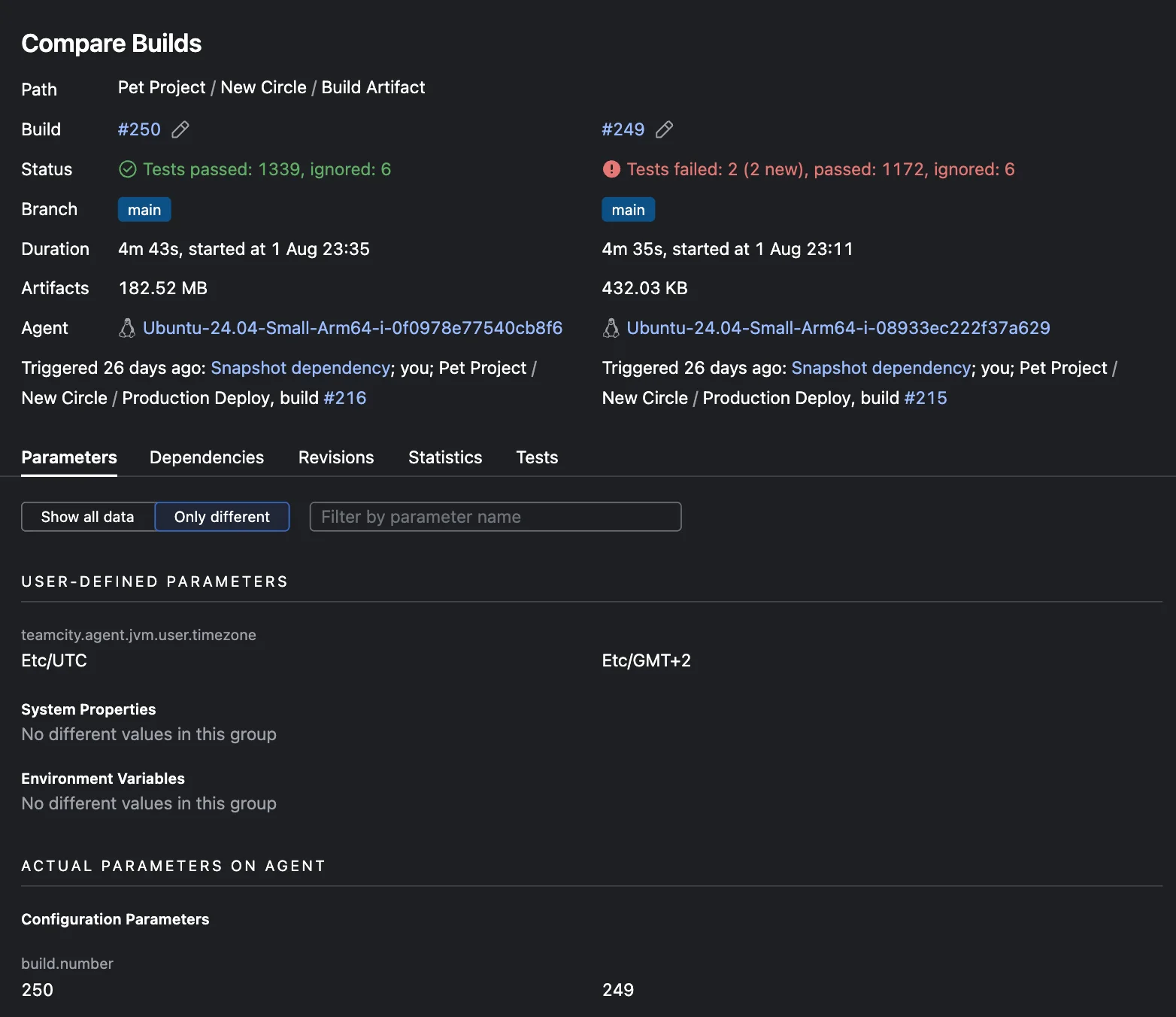
The header answers the questions I used to answer by hand from the logs: status (and what exactly failed — Tests failed: 2 (2 new)), branch, duration and start time, artifact size, the agent, and who or what triggered the build.
Two builds from the same night: 23:11 and 23:35, 24 minutes apart. But look at the Agent row — the builds ran on different machines.
Parameters → Only different: the suspects are in the diff
When you debug CI, the problem is usually not too little data. It's too much. If one build is green and the other is red, the full state of both builds doesn't matter much. The difference between them does. Parameters that are the same are rarely interesting. The suspects are in the diff.
That's why each of the five tabs — Parameters, Dependencies, Revisions, Statistics, Tests — has a "Show all data / Only different" switch. The main button of the whole feature.
A build has hundreds of parameters. I switch to "Only different", and only a few lines stay. One of them:

teamcity.agent.jvm.user.timezone Etc/UTC → Etc/GMT+2Wait. teamcity.agent.jvm.user.timezone is the time zone of the agent's own JVM. The test runs in its own JVM. That is a strong clue, not yet proof. I check it with one line in the test:
log.debug("testJvmZone={}", ZoneId.systemDefault());And I don't wait for the next night. I run the build on that same agent right now: DEBUG testJvmZone=Etc/GMT+2. Hypothesis confirmed. The test JVM really lives in a different time zone.
Now I know the exact failure condition: with the database on UTC, the test fails inside a known time window:
mvn test -Dtest=TransactionsTest#shouldSaveTransaction \
         -Duser.timezone=Etc/GMT+2
# red between 00:00 and 01:59 UTC; green later
One last thing. I stop looking at the test and look at what it calls. I open TransactionRepository, and here it is, inside transfer():
jdbcTemplate.update(
    "INSERT INTO transactions (sender, recipient, amount, created) VALUES (?, ?, ?, CURRENT_DATE)",
sender, recipient, amount);CURRENT_DATE. Java doesn't write the date. The database writes it, by its own clock. And that is the second "now".
Two different "todays": Java and the database live in different time zones
I fix the code, and then I sit down to write a post for the company's internal blog. Not a summary. The whole post:
Two todays
Hi everyone! I spent a week chasing a flaky test. Turns out the problem was not in the test. It was in my code. My code lived in two realities, with two different "todays".
Our test checked a simple thing: if a transaction was saved, you can find it "for today". But one operation had two "todays":
INSERT:  CURRENT_DATE
              ↓
         the database session time zone (UTC)

READ:    LocalDate.now()
              ↓
         the time zone of the JVM running the test (UTC−2)
At 00:30 UTC it is already August 15 for the database — and still August 14 for that agent's JVM. The record is in the database, just under a different date. (A separate trap: Etc/GMT+2 means UTC−2. In the Etc/GMT±N family the sign is historically inverted.)
None of this is in the logs — not the agent's time zone, not the database session time zone, not the start time. We could have guessed for weeks. We found it by comparing the failed build with the green one.
How to fix it. One business operation created two independent definitions of "now". Time can belong to Java or to the database. What matters: inside one operation, "now" comes from one place.
If Java is the owner, pass the date to the repository explicitly:
LocalDate today = LocalDate.now(clock);
transactionRepository.save(transaction, today);
// before: ... VALUES (?, ?, ?, CURRENT_DATE)
// after: the date comes from outside
void save(Transaction tx, LocalDate date) {
jdbcTemplate.update(
"INSERT INTO transactions (sender, recipient, amount, created) VALUES (?, ?, ?, ?)",
tx.sender(), tx.recipient(), tx.amount(), date);
}And to make the owner of time testable, inject a clock:
Instant instant = Instant.parse("2026-08-15T00:30:00Z");
Clock clock = Clock.fixed(instant, ZoneOffset.UTC);
LocalDate today = LocalDate.now(clock);
Clock turns midnight from something you wait for into something you create in a test.
If Java creates the date, the database must not call NOW(). If the database sets the date, Java must not call now().
People like the post. Likes, comments, "we had the same thing". Teams start to re-check their code and find similar places. They also find a few muted tests that were flaky for the same reason: someone once just turned them off and never found the cause. Now we are protected, by the rule and by the tool.
I was proud of myself. A few nights of red builds turned into more than a fixed test. They turned into a rule the whole company now uses.
The other tabs: three real-life cases
The time zone is my case. But the comparison tabs solve other everyday CI mysteries too:
- "Some tests disappeared — which ones exactly?" The Tests tab in "Only different" mode shows the difference between the test lists: what disappeared, what was added, what's marked new.
- "I changed and committed the code, but the build runs the old one." The Dependencies tab shows which upstream artifact the build used, and you see that the dependency pulled an old artifact. Your commit has nothing to do with it.
- "The build got much slower — where?" The Statistics tab puts the metrics of both builds next to each other, so you can see which step got heavier.
Where Compare Builds helps — and where it doesn't
Compare Builds compares the context TeamCity knows about: parameters, revisions, dependencies, statistics, tests. It can't see hidden machine state, network problems, or application state that was never visible to the build. If the cause is not in the environment, the commits, or the dependencies, you will still have to read the logs — but with a much shorter list of suspects.
Epilogue
I had investigations like this before Compare Builds existed. Back then I collected the agent, the commit, the parameters, the start time, all by hand, piece by piece, from logs and build history and configs. Later I built a tool that makes exactly this path short.
Compare Builds is the tool I would like to send back to my past self.
I commit the fix: the date comes from Java, and CURRENT_DATE is gone from the repository forever. The daytime run is green. The nightly one too. And the next one.
Morning. Coffee, chair, laptop. In Slack — an unread message.
Takeaway
About time: if an operation needs the idea of "now", define it in one place.
About CI: if the same code gives different results, first find out how the runs themselves were different.
In the next articles: a hands-on guide to Compare Builds — buttons, tabs, scenarios. Then parallel tests and the "JDK × OS × database" matrix, where the number of almost identical builds gets much bigger and comparing them turns from a convenience into the main tool.
Stop diffing logs by eye. Diff the builds.
FAQ
Why does one build fail and another pass on the same code?
The code is the same. The run context is not: agent, parameters, revisions, start time, time zone. Don't start by adding more logs. First find out how the runs themselves were different — compare the failed build with the nearest green one, and Only different will leave just the differences.
What is a flaky test?
A test that passes and fails on the same code, without any changes to it. Common causes: time and time zones, random data, test order, shared state, async timing. In this story the cause was a time zone difference between the test JVM and the database session.
How do I compare two builds in TeamCity?
Open the green build → Actions ("…") → Select for comparison. Then open the failed one → Actions → Add to comparison. The Compare Builds window shows parameters, revisions, dependencies, statistics, and tests side by side. Switch any tab to Only different to see just the differences. The feature exists since TeamCity 2019.2.
Where did my tests go?
The Tests tab in "Only different" mode shows the difference between the test lists of two builds: what disappeared, what was added, what's marked as new. No need to compare two thousand-test reports by eye.
I pushed new code, but the build still runs the old one — what do I check?
The Dependencies tab. If the artifact is the same as in the previous build, the upstream build was not triggered, and you are testing an old artifact. Check the dependency configuration — snapshot and artifact rules, triggers — not your code.